|
Nov
06
|
|

Pour ajouter un dégradé sur mes touches, j’ai récupéré un bout de code sur un site où je trouve énormément de bons exemples.
J’ai modifié mon script ainsi :
1 2 3 4 5 6 7 8 9 10 11 12 13 14 15 16 17 18 19 20 21 22 23 24 25 26 27 28 29 30 31 32 33 34 35 36 37 38 39 40 41 42 43 44 45 46 47 48 49 50 51 52 53 54 55 56 57 58 59 60 61 62 63 64 65 66 67 68 69 70 71 72 73 74 75 76 77 78 79 80 81 82 83 84 85 86 87 88 89 90 91 92 93 94 95 96 97 98 99 100 101 102 103 104 105 106 107 108 109 110 111 112 113 114 115 116 117 118 119 120 121 122 123 124 125 126 127 128 129 130 131 132 133 134 135 136 137 138 139 140 141 142 143 144 145 146 | unit main; interface uses Windows, Messages, SysUtils, Variants, Classes, Graphics, Controls, Forms, Dialogs, Keyboard, KeyboardTypes, Math; type TTempTouchKeyboard = class(TCustomTouchKeyboard); TMyKeyboardButton = class(TCustomKeyboardButton) public procedure Paint(Canvas: TCustomCanvas = nil); override; end; type TfrmMain = class(TForm) TouchKeyboard1: TTouchKeyboard; procedure FormCreate(Sender: TObject); end; var frmMain: TfrmMain; implementation {$R *.dfm} procedure GradVertical(Canvas:TCanvas; Rect:TRect; FromColor, ToColor:TColor) ; var Y: Integer; dr,dg,db: Extended; C1,C2: TColor; r1,r2,g1,g2,b1,b2:Byte; R,G,B:Byte; cnt:Integer; begin C1 := FromColor; R1 := GetRValue(C1) ; G1 := GetGValue(C1) ; B1 := GetBValue(C1) ; C2 := ToColor; R2 := GetRValue(C2) ; G2 := GetGValue(C2) ; B2 := GetBValue(C2) ; dr := (R2-R1) / (Rect.Bottom - Rect.Top); dg := (G2-G1) / (Rect.Bottom - Rect.Top); db := (B2-B1) / (Rect.Bottom - Rect.Top); cnt := 0; for Y := Rect.Top to Rect.Bottom-1 do begin R := R1 + Ceil(dr*cnt); G := G1 + Ceil(dg*cnt); B := B1 + Ceil(db*cnt); Canvas.Pen.Color := RGB(R,G,B); Canvas.MoveTo(Rect.Left, Y); Canvas.LineTo(Rect.Right, Y); Inc(cnt) ; end; end; procedure TMyKeyboardButton.Paint(Canvas: TCustomCanvas); var LRect: TRect; LCanvas: TCanvas; LCaption: String; const //TDrawState = (dsNormal, dsPressed, dsDisabled); acKeyColors: array[TDrawState] of TColor = (clWhite, clYellow, clGray); procedure DrawOneChar(rSize: TRect; cWhere: TCanvas; sWhat: string); begin rSize.Left := rSize.Left + (((rSize.Right-rSize.Left) - cWhere.TextWidth(sWhat)) div 2); rSize.Top := rSize.Top + (((rSize.Bottom-rSize.Top) - cWhere.TextHeight(sWhat)) div 2); cWhere.TextOut(rSize.Left, rSize.Top, sWhat); end; function GetOverrideCaption(Keyboard: TCustomTouchKeyboard; const Key: TVirtualKey; var Caption: string): Boolean; begin if Keyboard.CaptionOverrides.HasCaption(Key.PublishedName) then begin Caption := Keyboard.CaptionOverrides.GetCaption(Key.PublishedName); Exit(True); end else if Keyboard.CaptionOverrides.HasCaption(Key.PublishedName) then begin Caption := Keyboard.CaptionOverrides.GetCaption(Key.PublishedName); Exit(True); end; Result := False; end; begin if Canvas <> nil then LCanvas := Canvas as TCanvas else LCanvas := TTempTouchKeyboard(Parent).Canvas; LRect := ClientRect; LCanvas.Font.Name := 'Arial'; LCanvas.Pen.Color := clBlack; LCanvas.Font.Color := clYellow; //clBlack; LCanvas.Font.Style := [fsBold]; GradVertical(LCanvas, LRect, acKeyColors[State], clblack) ; // LCanvas.Brush.Color := acKeyColors[State]; // LCanvas.Rectangle(LRect); LCanvas.Brush.Style := bsClear; case KeyImage of kiOverride: begin if not GetOverrideCaption(Parent, Key, LCaption) then LCaption := Caption; DrawOneChar(LRect, LCanvas, LCaption); end; kiText: begin if ((Length(Caption) > 0) and ((Caption[1] = '^') or (Caption[1] = '¨'))) then Caption := Caption[1]; DrawOneChar(LRect, LCanvas, Caption); end; kiTab: DrawOneChar(LRect, LCanvas, 'Tabulation'); kiShift: DrawOneChar(LRect, LCanvas, 'Majuscule'); kiEnter: DrawOneChar(LRect, LCanvas, 'Entrée'); kiBackspace: DrawOneChar(LRect, LCanvas, '←'); kiUp: DrawOneChar(LRect, LCanvas, '↑'); kiDown: DrawOneChar(LRect, LCanvas, '↓'); kiLeft: DrawOneChar(LRect, LCanvas, '←'); kiRight: DrawOneChar(LRect, LCanvas, '→'); kiTallEnter: DrawOneChar(LRect, LCanvas, 'Entrée'); end; end; procedure TfrmMain.FormCreate(Sender: TObject); begin TouchKeyboard1.DefaultButtonClass := TMyKeyboardButton; TTempTouchKeyboard(TouchKeyboard1).CreateKeyboard(); TouchKeyboard1.Redraw; end; end. |
On a alors cette fois-ci un clavier comme cela :
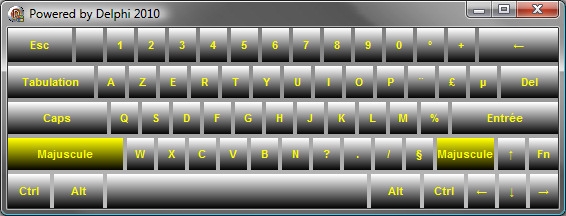
Delphi : Clavier tactile avec touches dégradées
(!!) Attention, cette application n’a pas vocation à remplacer le Clavier visuel fourni avec Windows : lorsque l’on clique sur une touche du clavier tactile, l’événement reste au sein de l’application qui a le focus, donc celle qui possède le clavier.
Cet exemple démontre le changement d’aspect du clavier, mais l’application en elle-même ne sert et ne fait rien 
Vous pouvez télécharger les sources de cet exemple ou l’application démo. J’ai également ajouté le test sur un paramètre /qwerty :
Si vous possédez un ordinateur avec un clavier en français, vous devriez voir un clavier AZERTY par défaut au lancement de l’application. Si vous appelez l’application en ajoutant /qwerty, le clavier sera ainsi en anglais.
1 2 3 4 5 6 7 8 9 | procedure TfrmMain.FormCreate(Sender: TObject); begin if ((ParamCount = 1) and (ParamStr(1)='/qwerty')) then LoadKeyboardLayout('00000409', KLF_ACTIVATE); // anglais TouchKeyboard1.DefaultButtonClass := TMyKeyboardButton; TTempTouchKeyboard(TouchKeyboard1).CreateKeyboard(); TouchKeyboard1.Redraw; end; |

Delphi : Clavier tactile QWERTY
(idea) Je me suis contenté d’écrire du texte sur chaque touche, mais on peut très bien imaginer afficher des images à la place des touches.
De même, le pavé numérique est directement disponible en changeant une simple propriété de l’objet, Layout = 'NumPad'.

Delphi : Pavé numérique coloré

 Rédigé par Whiler
\\ Tags : -Belly-, 2009, chat, coloration syntaxique, Delphi, localisation, script
Rédigé par Whiler
\\ Tags : -Belly-, 2009, chat, coloration syntaxique, Delphi, localisation, script


Pings: Openway : Représentant unique de la marque Codegear en France » Personnalisation du TTouchKeyboard de Delphi 2010